
Percentage Format Shortcut in Excel You Must Know
The Percentage Format Shortcut in Excel allows you to instantly convert numbers into percentage format using a simple keyboard shortcut. This method saves time, avoids manual formatting, and is especially useful when working with results, growth rates, marks, and performance-related data. In this article we will describe about percentage format shortcut in excel shortcut key, why use Percentage Formula in Excel & more
Percentage Format Shortcut in Excel You Must Know
In Excel, percentage formatting is commonly used for data analysis, reports, and calculations. Instead of manually opening the Format Cells option every time, Excel provides a quick shortcut that applies percentage formatting instantly.
This shortcut is ideal for beginners as well as advanced Excel users who want faster workflow.
Percentage Format Shortcut in Excel Shortcut Key
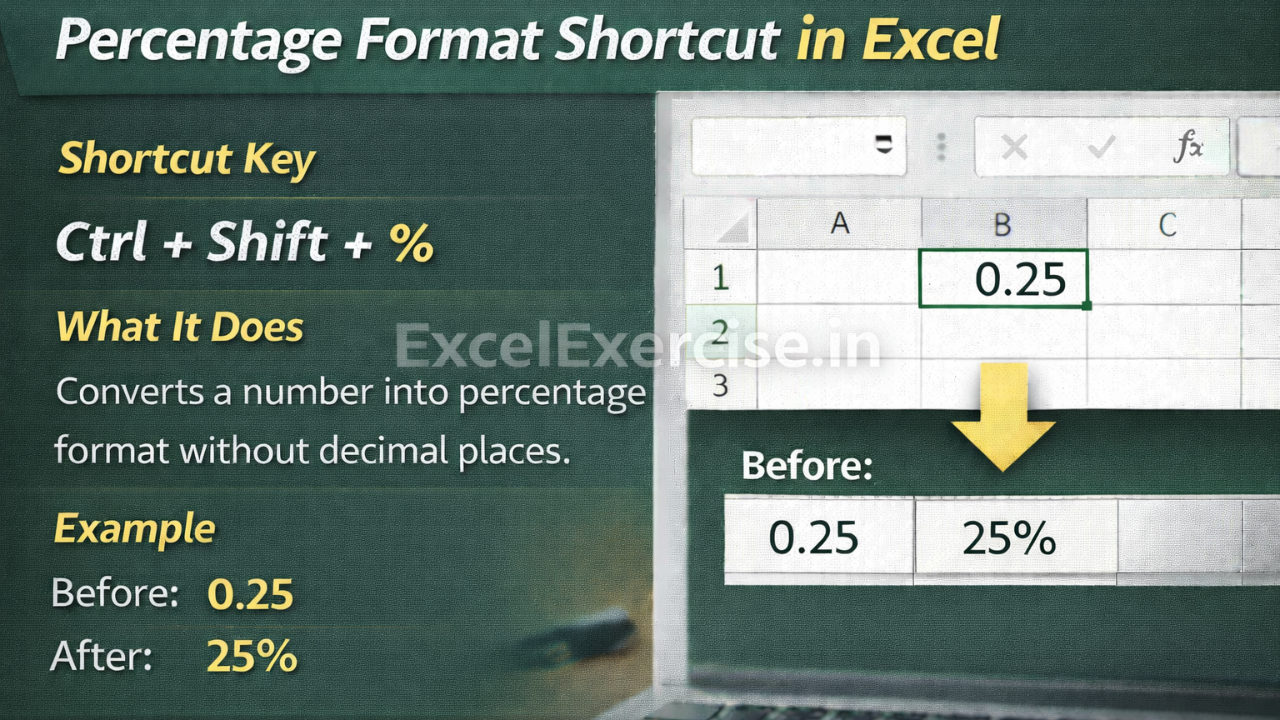
Shortcut Key
Ctrl + Shift + %
What This Shortcut Does
This shortcut converts the selected number into percentage format without decimal places. Excel automatically multiplies the number by 100 and adds the percentage (%) symbol.
It works instantly and does not require any mouse interaction.
Example: Before and After Using Percentage Shortcut
Before Applying Shortcut
0.25
After Applying Shortcut
25%
More examples for clarity:
0.5 becomes 50%
0.75 becomes 75%
1 becomes 100%
Where This Shortcut Is Useful
This shortcut is widely used in daily Excel tasks such as:
- Result analysis
- Growth rate calculations
- Marks and performance reports in Govt Job and Private sector
- Financial and sales data
- Statistical and survey reports
Important Point to Remember
If your number already contains decimal places, Excel will remove them when applying this shortcut. You can manually increase decimal places later if needed using the Increase Decimal option.
Why You Should Use Percentage Formula in Excel
Using shortcut keys improves speed and accuracy while working in Excel. Instead of repetitive formatting steps, this single shortcut helps you focus more on analysis and less on formatting.
The Percentage Format Shortcut in Excel is a must-know tool for anyone working with numbers. By using Ctrl + Shift + %, you can quickly convert values into percentages and create clean, professional-looking Excel sheets in seconds.
Important links:



1 thought on “Percentage Format Shortcut in Excel You Must Know”